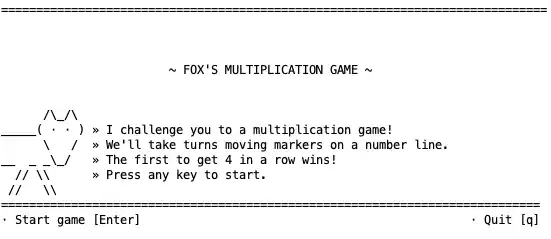
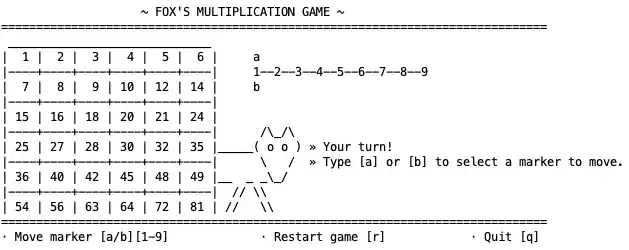
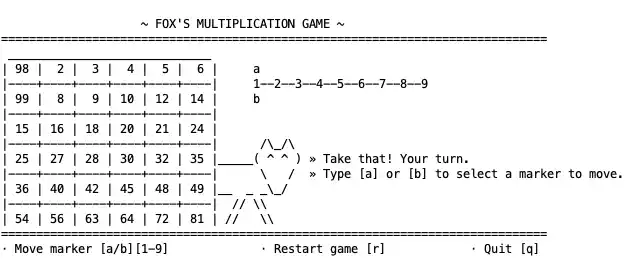
This project is a functional, turn-based “Multiplication Game” developed in MIPS Assembly. It challenges the player to use multiplication facts to beat a computer opponent by being the first to connect four markers on a grid.
The implementation demonstrates core low-level programming concepts, including:
- Modular Code Architecture: Separation of concerns across multiple
.asmfiles. - Game Loop Logic: A classic Render-Input-Update cycle.
- Dynamic UI Rendering: Procedural generation of a game board and sidebar ASCII art.
- Simple AI Logic: A rule-based computer opponent that searches for valid moves.
1. Project Structure
The codebase is divided into several modules to handle specific tasks:
| File | Purpose |
|---|---|
main.asm |
The entry point of the application. |
game.asm |
Orchestrates the main game loop and turn management. |
data.asm |
Contains all string constants, board templates, and ASCII art. |
io.asm |
Handles player input and the computer’s decision-making logic. |
view_gameboard.asm |
Manages the visual rendering of the 6x6 product grid and markers. |
search.asm |
Contains utility functions to find values within the product list. |
connection_counter.asm |
Logic for calculating win conditions (adjacent markers). |
2. Core Engine
main.asm
The entry point initializes the start screen and transitions into the main game loop.
.text
.globl main
main:
    jal start_screen 	# Display Start Screen

	# Wait for user to press a key to start
	li	$v0, 12			# syscall: read_char
    syscall

	j start_game 		# Jump to game loop

# Exit the game
.globl exit
exit:
	li $v0, 10
	syscall

.include "data.asm"
game.asm
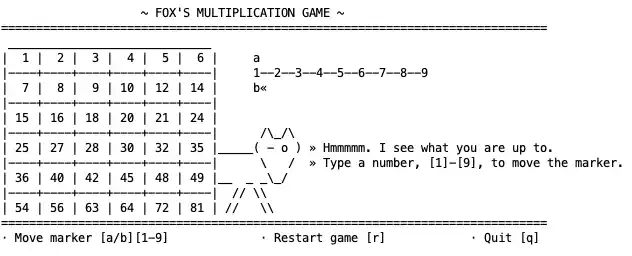
This module manages the state of the game, toggling between the player and computer turns using bitwise operations (xori).
.text
.globl start_game
start_game:
	# Initialize turn tracker
	li $s0, 0	# Player turn = 0; computer turn = 1

game_loop:
	# RENDER
	jal game_board

	# USER INPUT
	li  $v0, 12             # Read a single character
    syscall

    # Test for quit [q]
    beq $v0, 113, exit

	# UPDATE
	la   $t0, turn
	lw   $t1, 0($t0)   # $t1 = current turn

	bnez $t1, go_computer
go_player:
	jal player_turn
	j end_turn

go_computer:
	jal computer_turn
	j end_turn

end_turn:
	jal update_product_list

	# Toggle turn: if 0, make 1; if 1, make 0
	la   $t0, turn
	lw   $t1, 0($t0)
	xori $t1, $t1, 1
	sw   $t1, 0($t0)

    j game_loop # Repeat loop

.include "data.asm"

.globl turn
turn: .word 0   # 0 = player, 1 = computer

.globl products
products: .word 99, 2, 3, 4, 5, 6, 7, 8, 9, 10, 12, 14, 15, 16, 18, 20, 21, 24, 25, 27, 28, 30, 32, 35, 36, 40, 42, 45, 48, 49, 54, 56, 63, 64, 72, 81
3. Game Data & Assets
data.asm
This file serves as the central repository for UI strings and the ASCII art used for the start screen and game board.
.data
start_screen_msg:
	.ascii	"______________________________\n"
	.ascii	"THE MULTIPLICATION GAME\n"
    .ascii	"Get 4 in a row before the computer and you win! \n\n"
    .ascii	"Press Enter to play now!\n"
    .asciiz	"______________________________\n"

gameboard_header: .asciiz "\n### MULTIPLICATION GAME ###\n"
player_marker: .asciiz "<>"
computer_marker: .asciiz "><"
number_line: .asciiz "  1 2 3 4 5 6 7 8 9"
newline: .asciiz "\n+----+----+----+----+----+----+"
top_border: .asciiz "+----+----+----+----+----+----+\n"

start_art:
	.ascii " __  __       _ _   _       _ _           _   _\n"
	.ascii "|  \/  |_   _| | |_(_)_ __ | (_) ___ __ _| |_(_) ___  _ __\n"
    # ... (additional ASCII art lines)
4. Input & Logic
io.asm
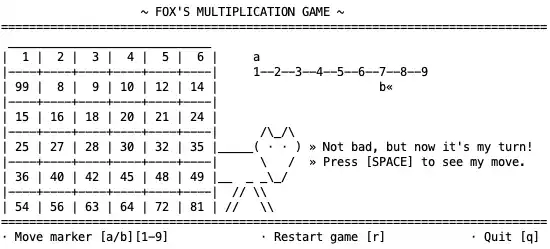
Handles user interactions and contains the automated “Computer Turn” logic, which scans the products list for viable moves.
.text
.globl player_turn
player_turn:
    la $t2, marker_a
    la $t3, marker_b

    li  $v0, 12             # Read marker selection (a or b)
    syscall
    move $t0, $v0

    li $v0, 12              # Read numeric value (1-9)
    syscall
    move $t1, $v0

    li $t4, 48
	sub $t1, $t1, $t4    # Convert ASCII to Integer

    beq $t0, 'b', update_b_marker

update_a_marker:
    sw $t1, 0($t2)
    j after_markers

update_b_marker:
    sw $t1, 0($t3)

after_markers:
	jr $ra

# --- Computer Turn Logic ---
.globl computer_turn
computer_turn:
    # Logic to iterate through 1-9 and find a product
    # currently available in the products list.
    # ... (Looping and multiplication logic)
    jr $ra
search.asm
A utility module used to determine if a calculated product exists in the game grid.
.text
.globl contains_number
contains_number:
    la $t0, products       # Pointer to products array
    li $t1, 0              # Index counter

search_loop:
    beq $t1, 36, not_found
    lw $t3, 0($t0)
    beq $t3, $a0, found

    addi $t0, $t0, 4
    addi $t1, $t1, 1
    j search_loop

found:
    li $v0, 1  # found = true
    move $v1, $t1
    jr $ra

not_found:
    li $v0, 0  # found = false
    jr $ra
5. Visual Rendering
view_gameboard.asm
This is the most complex UI component. It procedurally draws the 6x6 grid, inserts the markers (<> or ><), and aligns the sidebar ASCII art.
.text
game_board:
header:
    li  $v0, 4
    la  $a0, gameboard_header
    syscall

board_construction_loop:
    beq  $t1, 36, board_footer

    lw   $t2, 0($t0)               # Load product
    # Logic to print borders, padding, and markers...

    # Calculate row wrapping
    addi $t3, $t1, 1
    rem  $t3, $t3, 6
    bnez $t3, skip_nl

    # Print row sidebar and newline...

skip_nl:
    addi $t0, $t0, 4
    addi $t1, $t1, 1
    j    board_construction_loop
6. Win Condition Logic
connection_counter.asm
Calculates how many adjacent markers exist for a given position on the board. This is essential for determining when a player has achieved “4-in-a-row.”
# a0 is the argument = index in products list
.globl count_connected
count_connected:
    # Logic to check horizontal, vertical, and diagonal neighbors
	rem  $t0, $a0, 6      # Calculate position in row

	jr $ra
Conclusion
This MIPS project showcases how high-level game mechanics can be distilled into assembly instructions. By managing memory directly and utilizing the limited register set of the MIPS architecture, “The Multiplication Game” provides a robust example of low-level systems programming.